15 Favorite Job-site Mobile Apps
by Jonathan McGaha | 4 September 2013 12:00 am
 Almost everyone has a smartphone or tablet nowadays. And lately, smartphones and tablets are even showing up on the job site. At New York City-based Skanska USA Building Inc., everyone from project engineers to superintendents to project executives is using mobile devices for work.
According to Anthony Colonna, vice president of prefabrication operations and head of innovation at Skanska, access to information is key. “Without a mobile device, how many times are your trekking back and forth to the trailer just to answer a questions, or taking notes and getting back to someone?” he asks. “With the mobile devices, we have the latest information right at our fingertips, and so our team is much more effective in the field.”
“The other thing the mobile device does, is give you the most accurate information, so you’re no longer relying on paper,” Colonna adds. “With everything being electronic, you’re always guaranteed of seeing the latest and greatest information. And it’s not just for us, it’s also for our subcontractors because we share information with them electronically, and we are finding that they have mobile devices as well.”
At Cleveland-based Therm-All, mobile apps, ranging from cloud-based hosting sites to apps allowing users to review projects in real time, are a staple, says Bridget Mahovlic, marketing manager. Mobile software can serve many purposes, she notes, whether reviewing drawings in the office or meeting builders on the job site. “We’re incorporating technology in just about every way we can,” Mahovlic says. “We see the value in what it can do for us.”
“The future of conducting business in the metal building industry is on the cloud,” says Kyle Smigel, district manager at Therm-All. “Mobile applications have made accessing, editing and sharing important documents effortless. They’ve improved our response times and allow us to focus more on serving our customers and worry less about administrative details.”
Here are some of our favorite mobile apps used across the metal construction industry:
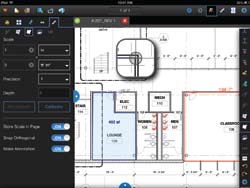
Bluebeam Revu for iPad
(Available in iTunes): Bluebeam Revu for iPad allows users to access and navigate PDF files on the go, from anywhere. Redline PDFs with industry-standard symbols and verify measurements in the field. Custom markups can be saved for reuse across sessions, and collaboration with colleagues around the globe in real time is made easy with Revu’s cloud-based solution, Bluebeam Studio. Version 2.0 features field measurement verification tools, the ability to fill in PDF AcroForms, and speech-to-text markups via Siri. Therm-All district managers use Bluebeam Revu to review projects with builders in real time.
Safety Symbol Library
(Available in iTunes): The Safety Symbol Library features comprehensive information on safety instructions and warning messages in technical documentation. It also features free previews of a guide on writing compliant and useful safety alerts. Skanska employees use the Safety Symbol Library as an easy was to look up SDS and symbols that are used everyday.
Scanner Pro by Readdle
(Available in iTunes): Scanner Pro allows users to take a picture of anything, such as a document, drawings, forms, job-site photos, etc., and convert it instantly into a PDF. Documents can be uploaded directly to Google Docs, Dropbox, or even save it to an Evernote account. iCloud sync allows files to be accessible on any iPhone or iPad. It is especially useful for creating digital copies of items while on a job site or in a builder’s office. “Sometimes builders don’t have drawings in digital form yet, so there have been times when I’ve taken pictures of the hard copies and emailed them to our office as a PDF to have a quote run while I’m still in the builder’s office,” says Smigel. “Converting the picture into a PDF creates a professional way to instantly share important data effectively.”
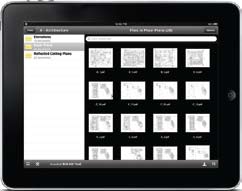
Autodesk BIM 360 Field (Available in iTunes): Used with a license for the software, most projects at Skanska use Autodesk BIM 360 Field for their closeout punchlist activities. The construction field management software enables BIM 360 Field users to create and update issues, reference project documents, and run QA/QC, safety and commissioning checklists throughout all project phrases. Drawings and photos can be marked up to show progress, and BIM models can be viewed on iPads in 3-D, allowing users to access key design information and track project progress.
iBooks (Available in iTunes): Therm-All District Managers keep full versions of the IECC 2012, IECC 2009 and ASHRAE 90.1 code books in iBooks for easy access. With iBooks, users can bookmark, highlight and jump to a page just by tapping the chapter title in the table of contents. “I am constantly referencing the codes from my iPad,” says Smigel. “I couldn’t imagine having to carry hard copies of all these books around with me to builders’ offices or job sites. This app makes that possible.”
ICC Market (Available in iTunes): Keep codes and references at your fingertips with the ICC Market App from the International Code Council (ICC). Users have the ability to browse available ICC code and reference book titles, purchase them, read and use immediately. Current titles available include the entire collection of 2006 and 2009 International Codes, 2010 California Codes, 2007 Florida Codes with the 2009 supplement, 2010 New York State Codes, all 2006 I-Code and Commentaries, and the 2009 Code Interpretations publication, with more available soon.
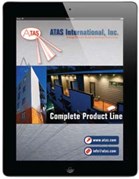 ATAS Product Line (Available in iTunes): The ATAS Complete Products Line app was created to change the way that people research and spec a project using ATAS products. Once downloaded the app works by swiping left to right to change products and swiping up and down to reveal more information about each product. The app takes users through recent project installations, as well as technical product information. The easy-to-use app provides information on how an ATAS product will change the look, function, energy efficiency, life span and cost savings on a building project.
GoToMeeting (Available in iTunes and Google Play): Collaborate with everyone involved with a project, regardless of where they may be, with the GoToMeeting app. The app works on iPad, iPhone or iPod, allowing users to join, host or schedule a meeting. Users can also view slide presentations, design mockups, spreadsheets and more from their phone or tablet.
 Dropbox (Available in iTunes and Google Play): Ideal for storing just about anything, the Therm-All sales team uses Dropbox for accessing important files on-the-go, such as spec sheets. Since Dropbox is cloud-based, users don’t have to worry about forgetting an important file on their desktop. Additionally, it makes file sharing easier than ever. “Dropbox is ideal for sending large files-especially drawings-between users,” says Smigel. “People can edit and work on documents that are automatically updated for all users accessing the folder. It’s also great because it syncs between PCs, Macs, iPhones/iPads and Androids, so anyone can use it.” For Skanska, using Dropbox allows easy sharing of documents with the project team, saving time.
| Smartphone Use on the Job-site
A 2013 Connecting with Contractors study[1] by EMA Contractors[2], a specialty group at Eric Mower + Associates[3], Syracuse, N.Y., shows that contractors’ use of smartphones while on the job has jumped 35 percent from last year. Additionally, the use of tablets rose nearly 54 percent over last year, with 22 percent of contractors using tablets overall. Sixty-eight percent of contractors say they are using smartphones as a part of their workday. Forty percent of the contractors surveyed said they are using smartphones when making purchasing decisions, making it second to desktop computers at the office. Additionally, 56 percent of respondents think smartphones are the fastest growing technology device in the building and construction space, followed by tablets in second place with nearly 20 percent. “Smartphone and tablet use among contractors on the job site continues its dramatic rise and marketers that are not focusing resources in this area are missing an important opportunity,” says John O’Hara, EMA partner and leader of EMA Contractors. “At a minimum, marketers should be looking at developing apps that help contractors do their job, websites that are optimized for mobile devices and product literature that can be properly used on tablets.” Convenience is driving the use of technology devices on the job site, as smartphones and tablets allow contractors to stay connected with coworkers, distributors and vendors/subcontractors, while increasing productivity and saving time on the job. The ability to check specifications, compare products and prices is also very important, as is the need to have information available quickly. At any given time, 82 percent of general contractors are using smartphones and 30 percent are using tablets. Thirty-two percent of general contractors said they believe using technology devices will allow them to ultimately cut overall costs at work. The study was constructed among 200 U.S. general contractors, electricians, plumbers and HVAC specialists. To learn more, visit www.mower.com[4]. |

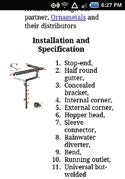
VMZINC-US App (Available in iTunes and Google Play): Umicore Building Products’ VMZINC app makes it easier for clients to find and review the company’s building products. The app serves as an extension of the VMZINC website, creating visual continuity as well as being easy to navigate for any user with experience with VMZINC online. The image-loaded app allows users to view photographs of the company’s zinc products utilized in multiple contexts from commercial to residential, and from façades to roofs. The goal was to emphasize the different ways zinc can be incorporated into almost any type of building. The app also includes a specially design product selector to filter choices on type of material to use based on specific needs or aesthetic preferences. It can also be used to find VMZINC representatives in the area.
AroundMe (Available in iTunes and Google Play): Need a break, or looking for somewhere new to try for lunch? The AroundMe app allows users to quickly find out what’s near them, whether it’s a bank, gas station, restaurant or supermarket. Users can see the listing’s location on the map, view routes, and even email the information to a friend to meet you there.
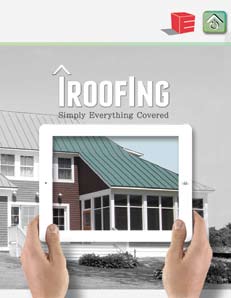
iRoofing (Available in iTunes): Englert Inc.’s iRoofing app allows users to use their iPads to research projects, and order samples and roofing materials. Contractors and customers can remotely order roof plans, or use the roof visualizer tool to photograph any structure and in seconds add an Englert metal roof in any profile and color. Additionally, contractors can use iRoofing to order material, or view technical information including building approval forms and installation guides.
iAnnotate PDF (Available in iTunes and Google Play): iAnnotate allows users to read, mark up, and share PDF, DOC, PPT and image files from their tablets. The app has an intuitive interface and a comprehensive, customizable set of features make it easy to work with files. The iAnnotate app also integrates with Dropbox, allowing Skanska team members to mark up drawings and share them in the field.

Firestone BP (Available in iTunes): Firestone BP iPad app allows building owners, facility managers, contractors, architects, consultants and more to explore how Firestone Building Products integrates people, products and systems to find the best building solutions for specific facility needs. The app provides multiple views of Firestone Building Products and solutions in a variety of real-world settings, along with product specifics.
DeWalt Mobile Pro (Available in iTunes): DeWalt Mobile Pro offers construction professionals a full-featured calculator and reference tool. It comes with a construction and scientific calculator in addition to calculator templates for area, length, volume, as well as estimating studs, drywall and concrete slabs. In-app purchases include topics on carpentry, finished materials, trim work, site work and more, developed with professionals in the field.
- 2013 Connecting with Contractors study: http://www.mower.com/news/inthenews/article.php?id=1146
- EMA Contractors: http://www.mower.com/microsites/building-construction/contractors/
- Eric Mower + Associates: http://www.mower.com/
- www.mower.com: http://www.mower.com
Source URL: https://www.metalconstructionnews.com/articles/15-favorite-job-site-mobile-apps/